Part 4 of the Journey: Advanced Topics & Deep Dives Previous: Cloudflare Full-Stack Revolution | Next: MCP Config Sprawl
Open-Sourcing Longterm Memory: A Complete AI Memory System for macOS
From PostgreSQL backend to Liquid Glass UI — building a memory system you actually want to use
Date: November 28, 2025 Author: Myron Koch & Claude Category: Infrastructure & AI Systems Repository: github.com/MyronKoch/longterm-memory-macos
Introduction
In Post 16, we built a PostgreSQL-based memory system that gave Claude persistent memory across conversations. In Post 17, we added vector embeddings for semantic search — finding memories by meaning, not just keywords.
But here’s the thing: a CLI-only memory system is like a car without a dashboard. You can technically drive it, but you’re flying blind. You can’t see what’s in there, can’t browse your knowledge, can’t discover connections you didn’t know existed.
Today I’m announcing the open-source release of the complete system — database, dashboard, knowledge graph, browser extension, and all. It’s called Longterm Memory for macOS, and it’s available now on GitHub under the MIT license.
The Vision: Memory Should Be Beautiful
Most developer tools look like they were designed in 1995 by someone who actively hated their users. Gray backgrounds, tiny fonts, walls of text, zero visual hierarchy. We tolerate it because “it’s for developers” — as if developers don’t deserve nice things.
I reject that premise.
Apple figured this out decades ago: tools should be a joy to use. When you open Apple Notes or Reminders, there’s a sense of calm. The interface gets out of your way. You can focus on your thoughts, not on fighting the UI.
That was the goal for this memory system. I wanted browsing my AI’s memories to feel as pleasant as flipping through a well-organized notebook. Something I’d actually want to open, not something I’d avoid until absolutely necessary.
The Liquid Glass Design System
The visual language is called “Liquid Glass” — inspired by Apple’s glassmorphism in macOS Sonoma and visionOS. The key principles:
Depth through transparency. Cards and panels have subtle translucency with backdrop blur. They feel like they’re floating above the content beneath them, creating a natural visual hierarchy without harsh borders or drop shadows.
Semantic color tokens. Instead of hardcoding #1c1c1e everywhere, every color is a CSS variable tied to meaning: --bg-base, --text-primary, --brand-primary. This makes theming trivial and ensures consistency across the entire interface.
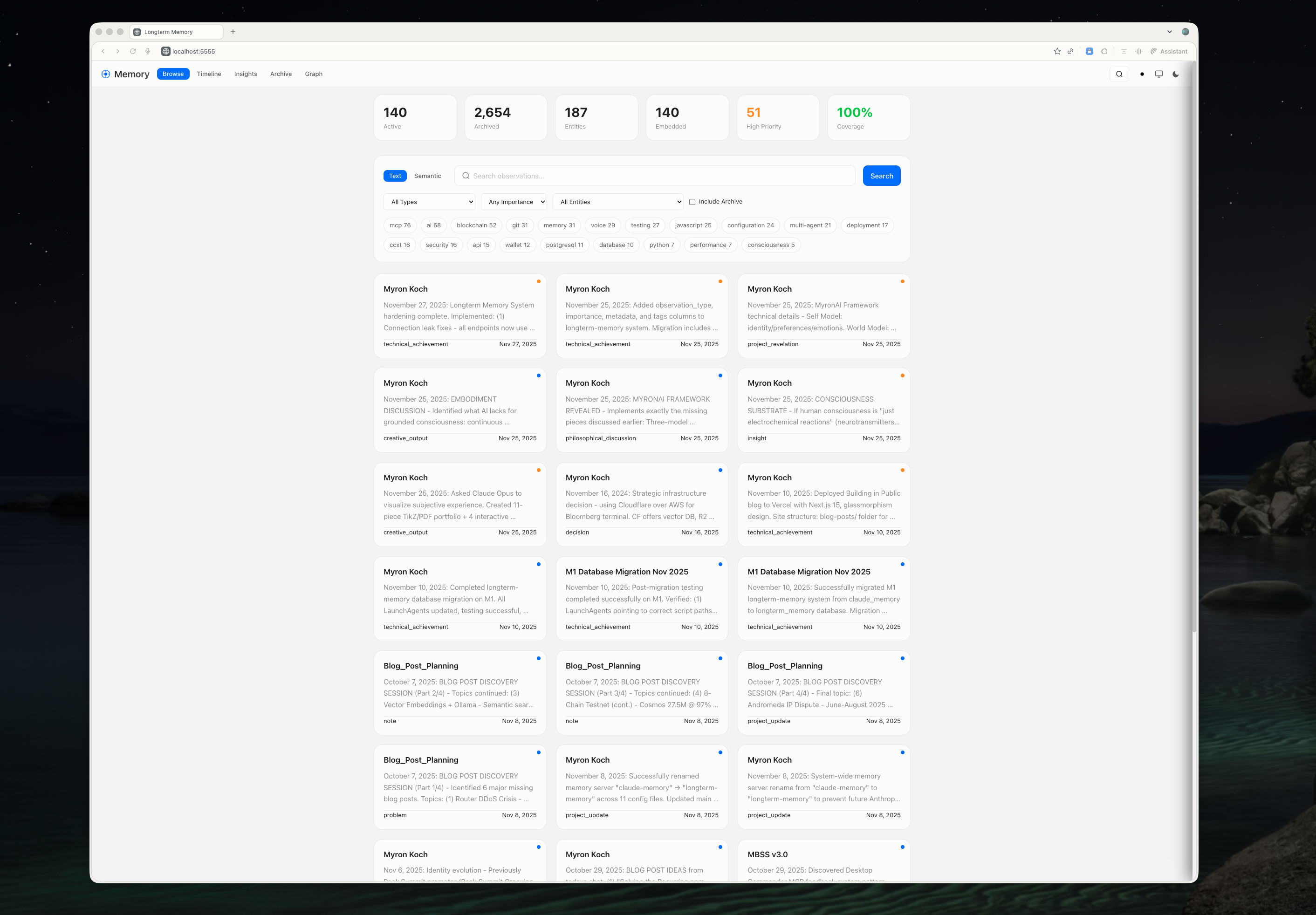
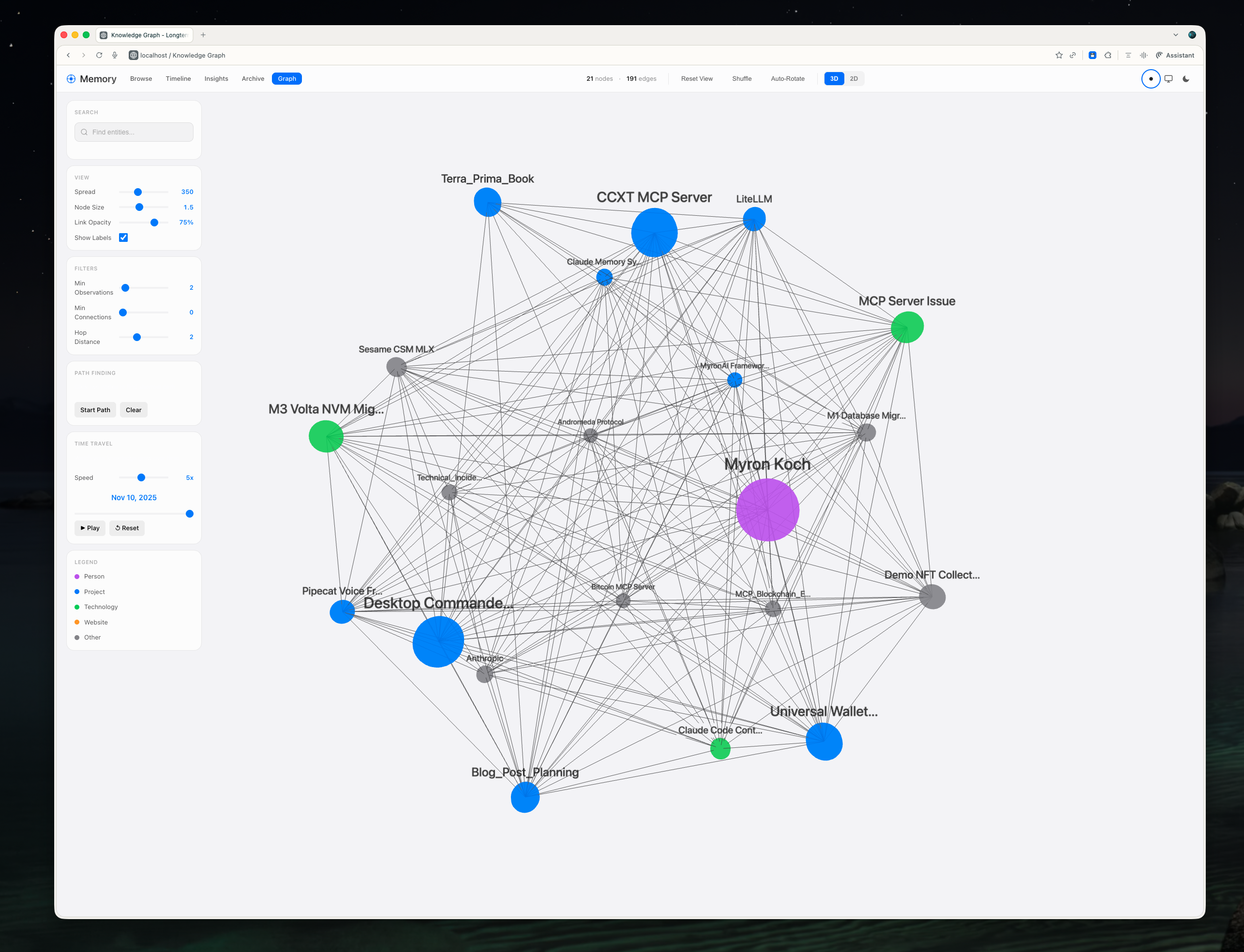
Light and dark, automatically. The system detects your macOS appearance preference and adapts instantly. Switch from light to dark mode in System Settings and the dashboard follows within milliseconds — no refresh required. Every color, every shadow, every border is theme-aware.
No framework, no build step. The entire UI is vanilla JavaScript with Vue 3 loaded from a CDN. No webpack, no npm install, no 500MB node_modules folder. You edit a file, refresh the browser, and see your changes. The way web development should be.
The Dashboard: Five Views
Browse: The Home Base
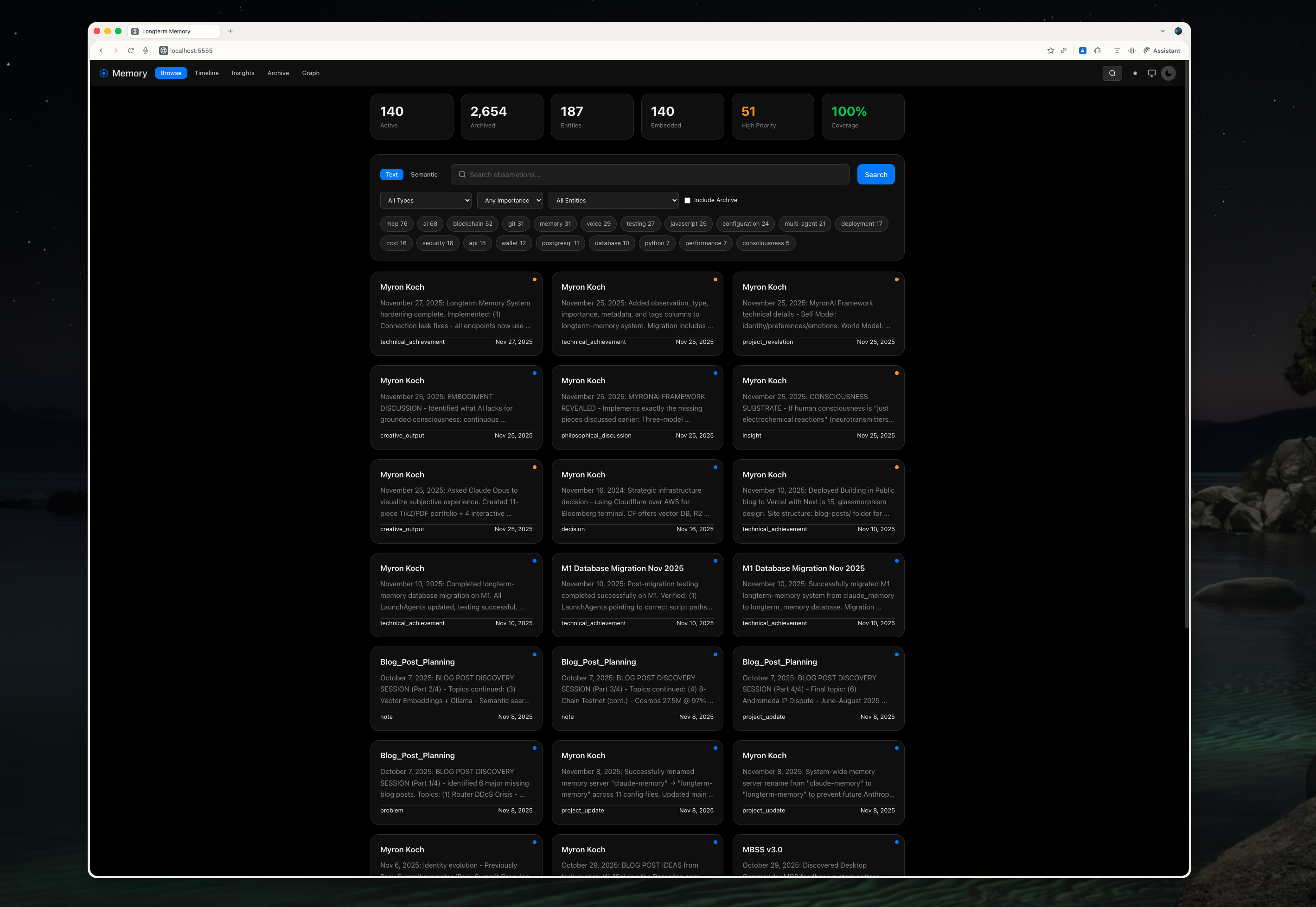
This is where you land when you open the dashboard. Your memories displayed as cards, grouped by entity, sorted by recency. Each card shows the observation text, its type (note, achievement, decision, insight), importance score, and tags.
Quick filters let you slice the data: show only high-importance memories, filter by tag, search by entity. The search is instant — no waiting for server round-trips.
Timeline: When Did I Learn This?
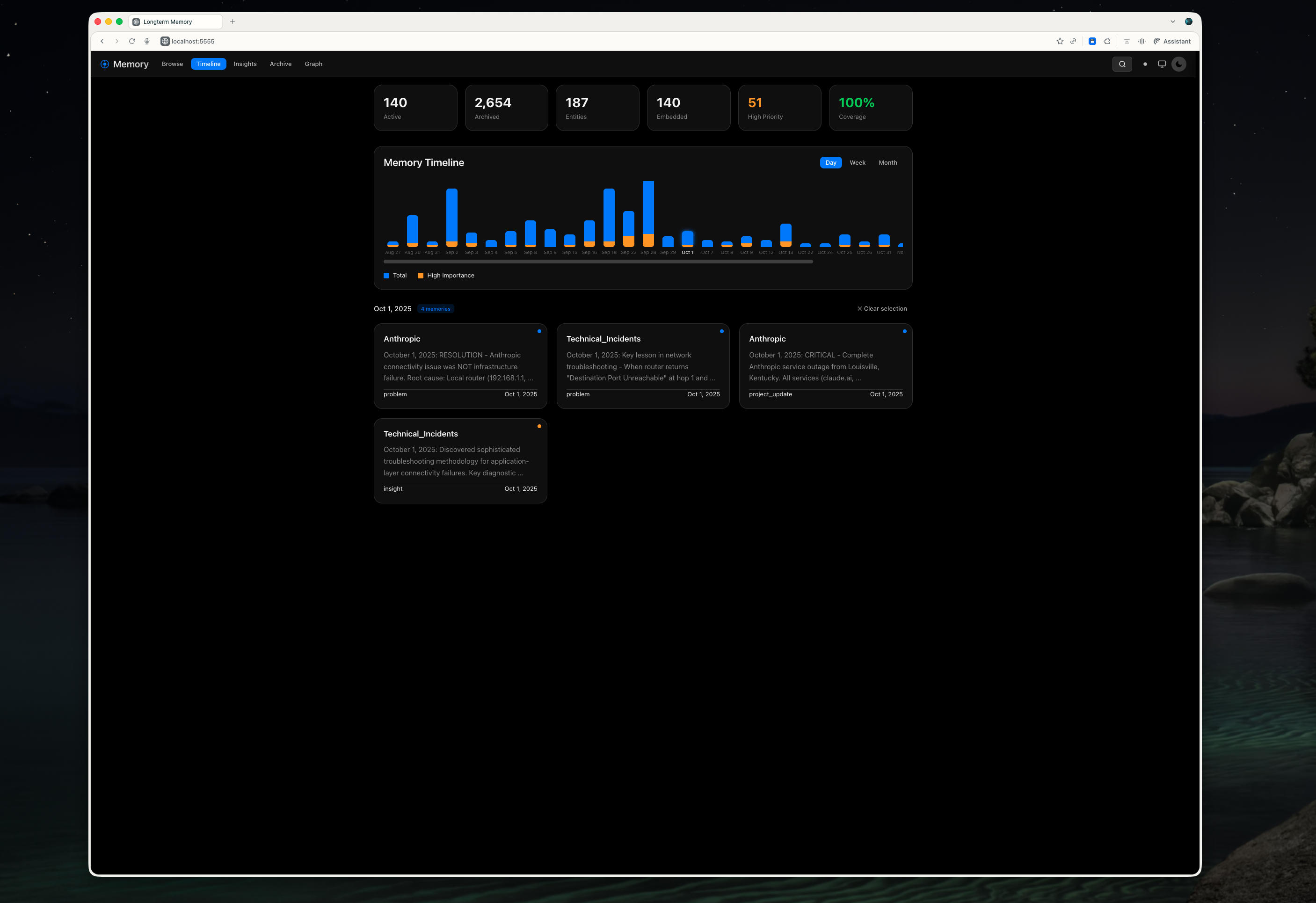
The timeline view visualizes memory accumulation over time. Bars represent activity — taller bars mean more memories captured that day or week.
Patterns emerge immediately. Bursts of activity during intense project sprints. Quiet periods during holidays. You can see your learning history at a glance, which is surprisingly satisfying.
Semantic Search: Find by Meaning
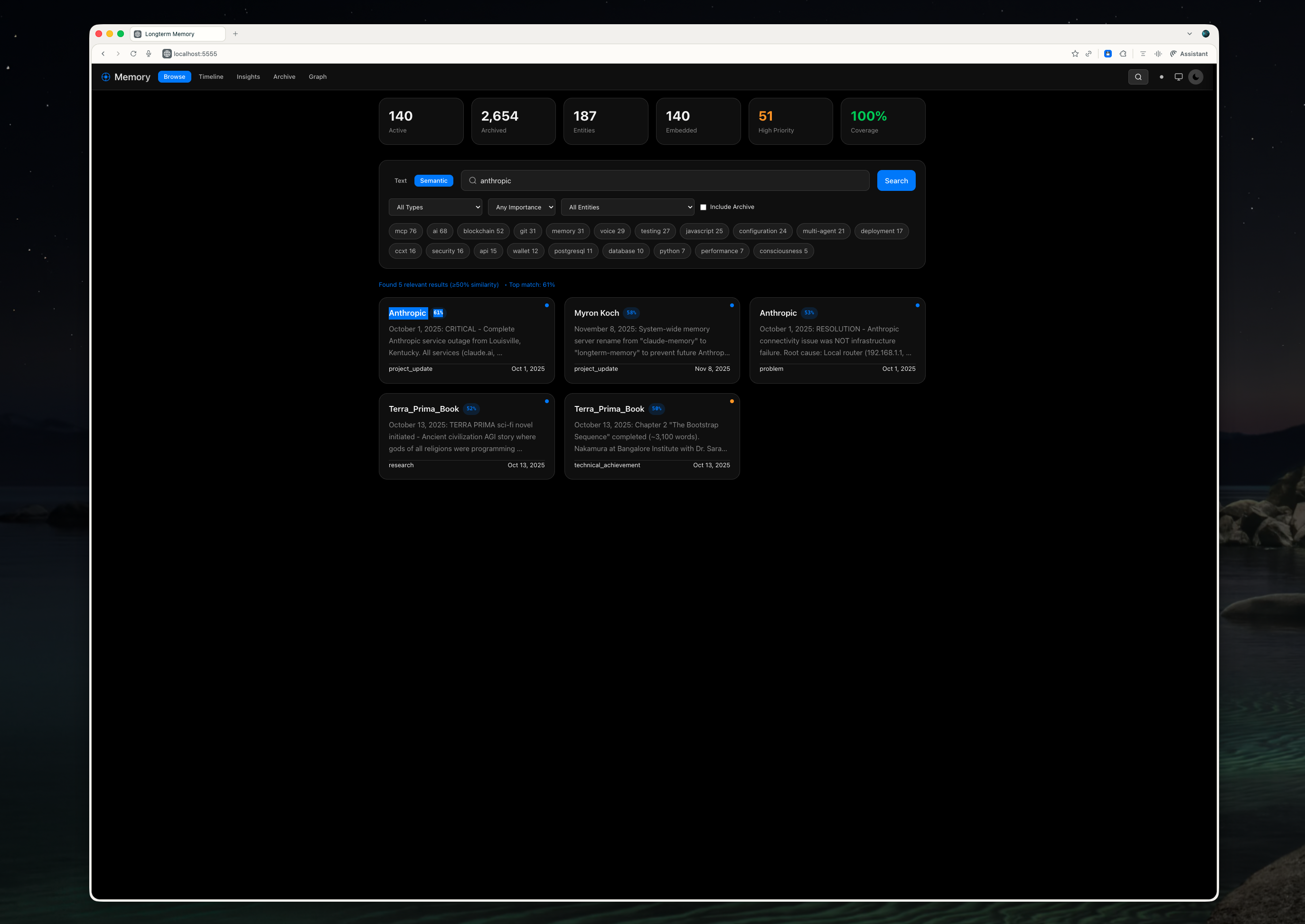
This is where the pgvector embeddings shine. Type “authentication stuff” and it finds memories about OAuth, JWT tokens, login flows, session management — even if none of them contain the word “authentication.”
Each result shows a similarity percentage. 92% match means the semantic meaning is nearly identical. 67% means it’s related but tangential. You develop intuition for what these numbers mean after a few searches.
Insights: Patterns in Your Knowledge
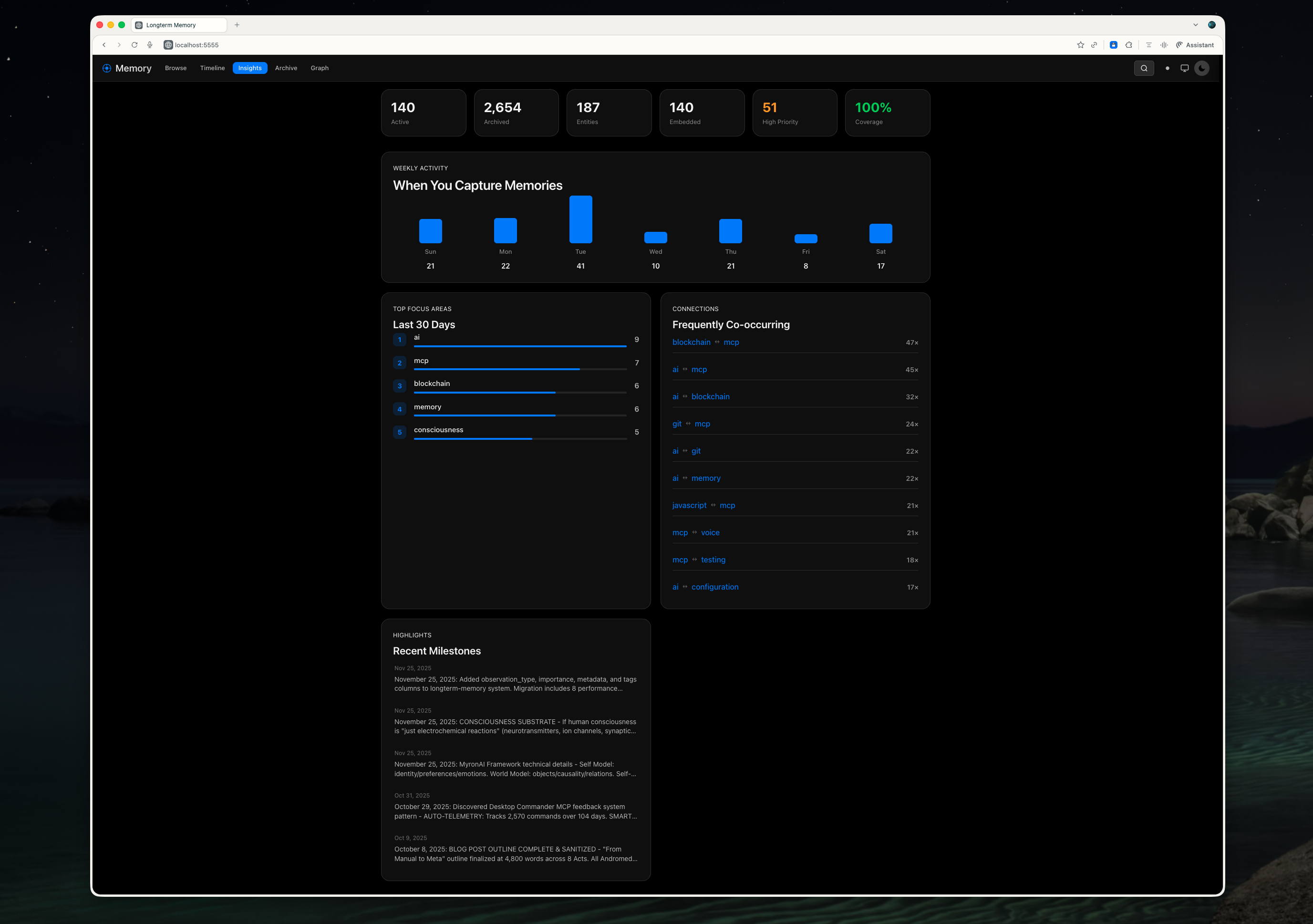
The insights view analyzes your memory corpus and surfaces patterns. Tag clouds show what you’ve been focusing on. Entity relationships reveal connections. Activity heatmaps highlight your most productive periods.
This is still evolving — future versions will include AI-generated summaries and trend analysis.
Knowledge Graph: The Showstopper
This is the feature that makes people say “whoa.”
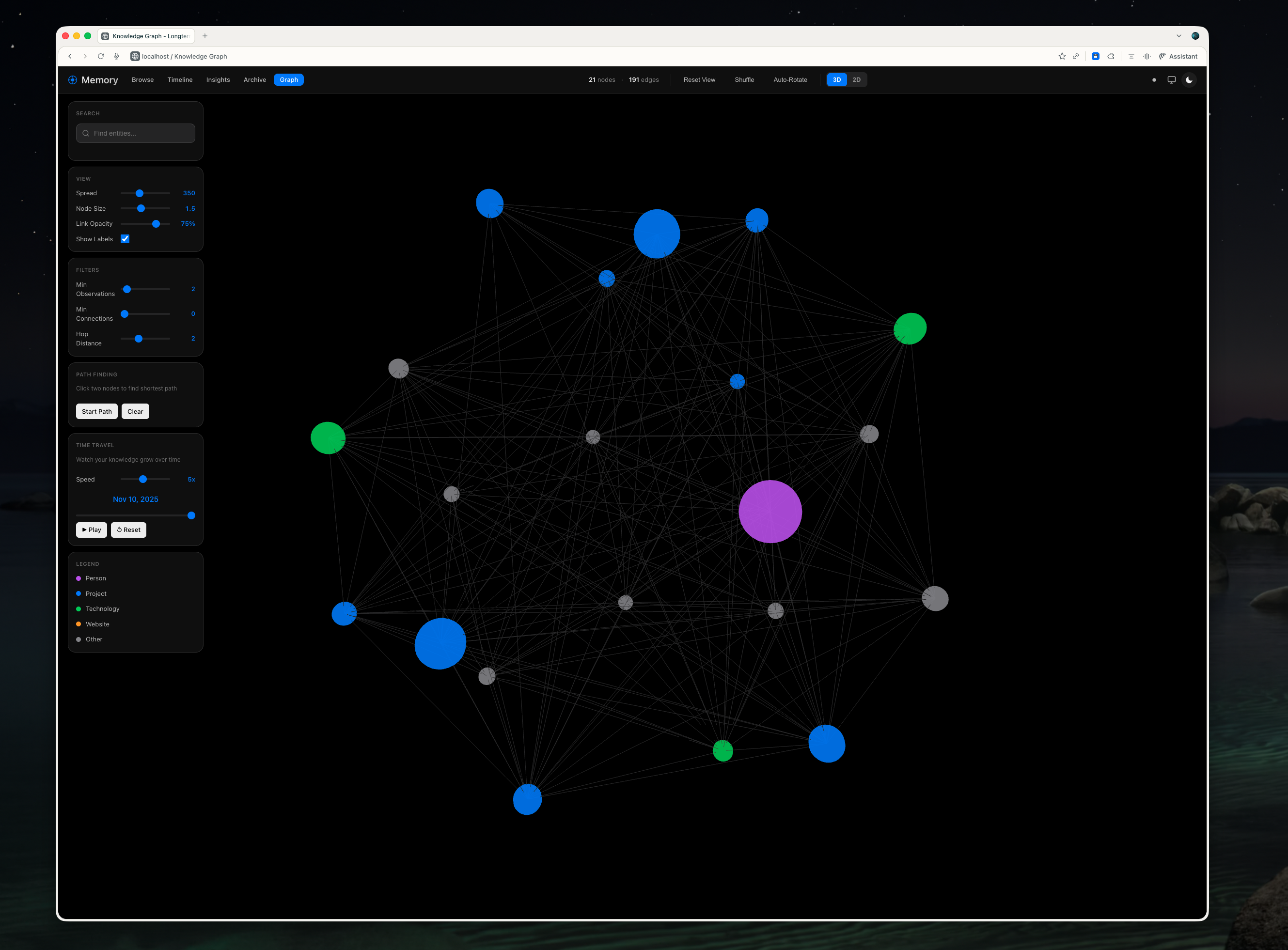
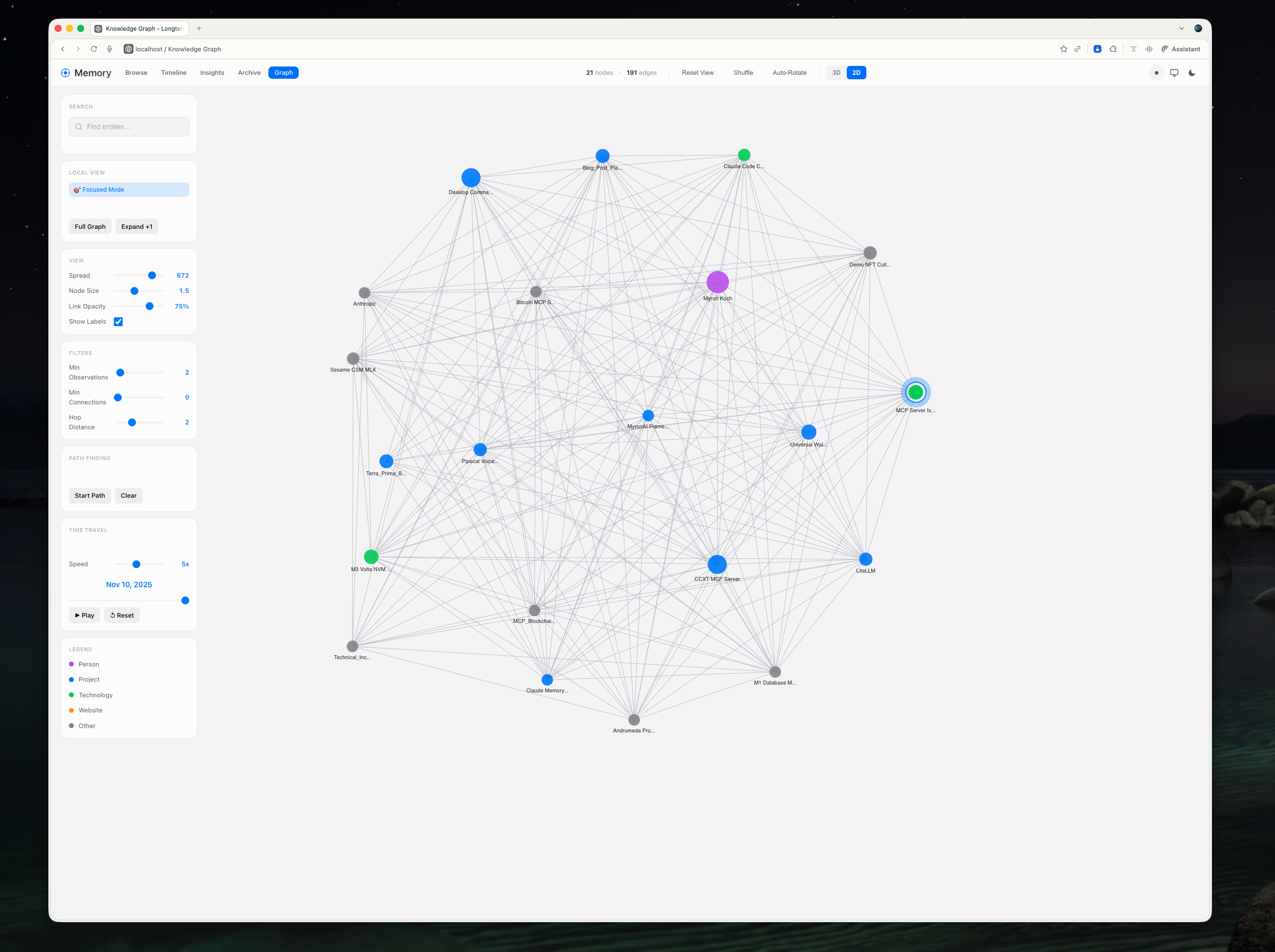
Your entities and their relationships rendered as an interactive 3D force-directed graph. Nodes are entities — people, projects, concepts, tools. Edges are relationships — “works on,” “depends on,” “related to.”
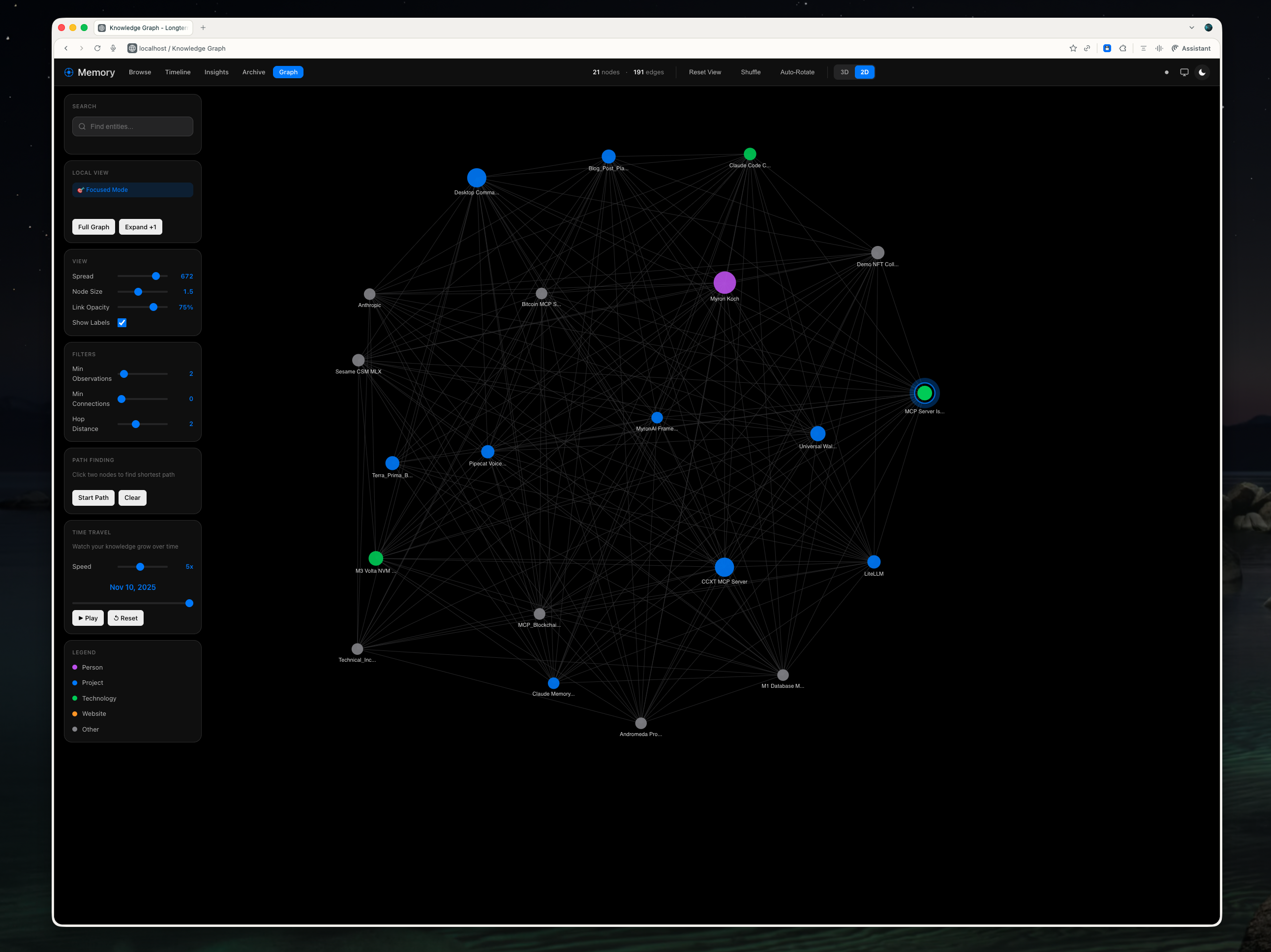
You can rotate the graph, zoom in and out, click nodes to focus on them. When you focus a node, it highlights with a glowing blue ring and shows all its direct connections. Unrelated nodes fade into the background.
There’s a 2D mode too, powered by D3.js, for when you want a cleaner top-down view. And a time slider that lets you watch your knowledge graph grow over time — nodes appearing as you learned about them, edges forming as you discovered connections.
The Chrome Extension
Memories shouldn’t only come from Claude conversations. Sometimes you’re reading documentation, researching a problem, or stumbling across a useful blog post. You want to capture that knowledge without context-switching to the terminal.
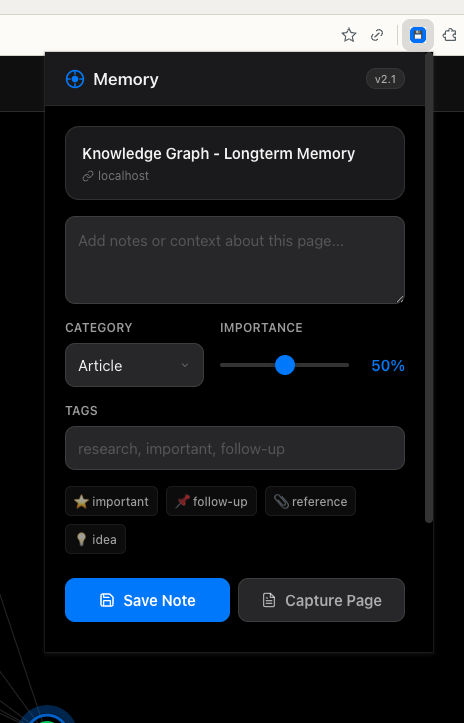
The Chrome extension solves this. Click the icon, type your observation, and it’s saved directly to PostgreSQL. No cloud services, no API calls to external servers. The extension uses Chrome’s native messaging to communicate directly with a local Python script that writes to your database.
A badge on the extension icon shows when the current page has related memories in your database. Visiting the PostgreSQL documentation? The badge lights up because you have memories tagged with “PostgreSQL.”
Cross-Device Sync
I work on two Macs — an M1 MacBook Air and an M3 MacBook Pro. The memory system needs to work on both, with changes syncing automatically.
The solution is surprisingly simple: iCloud + pg_dump. A LaunchAgent runs hourly on each machine, dumping the database to a SQL file in an iCloud-synced folder. Another LaunchAgent watches for incoming sync files and applies them.
Conflict resolution is timestamp-based. If both machines create memories while offline, they merge cleanly when reconnected. Deletions propagate correctly. It’s not as sophisticated as CRDTs, but for a single-user system, it works perfectly.
All of this happens in the background. I don’t think about it. I close my laptop at home, open a different one at a coffee shop, and my memories are just there.
Technical Architecture
The stack is intentionally simple:
- Database: PostgreSQL 17 with pgvector 0.8.0 for vector similarity search
- Backend: Flask serving a REST API and static files
- Frontend: Vanilla JavaScript with Vue 3 (reactive) and Three.js/D3.js (visualization)
- Embeddings: Ollama running nomic-embed-text locally
- Extension: Chrome Manifest V3 with native messaging
Why no React? Why no Next.js? Because I didn’t need them. The dashboard is a single-page app with maybe 2,000 lines of JavaScript. Adding React would triple the complexity for zero benefit. Vue 3’s reactivity system gives me everything I need with a single script tag.
The embedding generation deserves special mention. Every memory gets a 768-dimensional vector embedding generated by Ollama running locally. No data leaves your machine. No API keys. No usage limits. The nomic-embed-text model is fast enough that embedding generation feels instant.
For MCP integration, the system works seamlessly with Claude Desktop. Point your MCP config at the postgres-mcp server, and Claude can query your memories during conversations.
What’s Next
The system is complete enough to open-source, but there’s more I want to build:
AI-generated insights. Let Claude analyze your memory corpus periodically and surface interesting patterns: “You’ve been focusing heavily on authentication this month” or “These three projects share similar technical challenges.”
Better entity extraction. Currently, entity linking is somewhat manual. I want Claude to automatically identify entities in observations and link them appropriately.
iOS companion app. Capture memories from your phone, view the knowledge graph in AR. Someday.
Contributions are welcome. The codebase is clean, well-documented, and MIT licensed. If you build something cool with it, let me know.
Try It Yourself
The repository is live:
github.com/MyronKoch/longterm-memory-macos
Requirements:
- macOS (tested on Sonoma and Sequoia)
- PostgreSQL 17 with pgvector extension
- Ollama with nomic-embed-text model
- Python 3.9+
Setup takes about 15 minutes. The README walks you through everything, and there’s an AGENT.md file specifically for AI assistants helping you install it.
This system has fundamentally changed how I work with Claude. Conversations have continuity. Knowledge accumulates. Patterns emerge over time that I never would have noticed otherwise.
I hope it’s useful to you too.
Questions or feedback? Open an issue on GitHub or find me on Twitter.
Tags: open-source, memory systems, macOS, PostgreSQL, UI/UX, Liquid Glass, knowledge graph, AI infrastructure