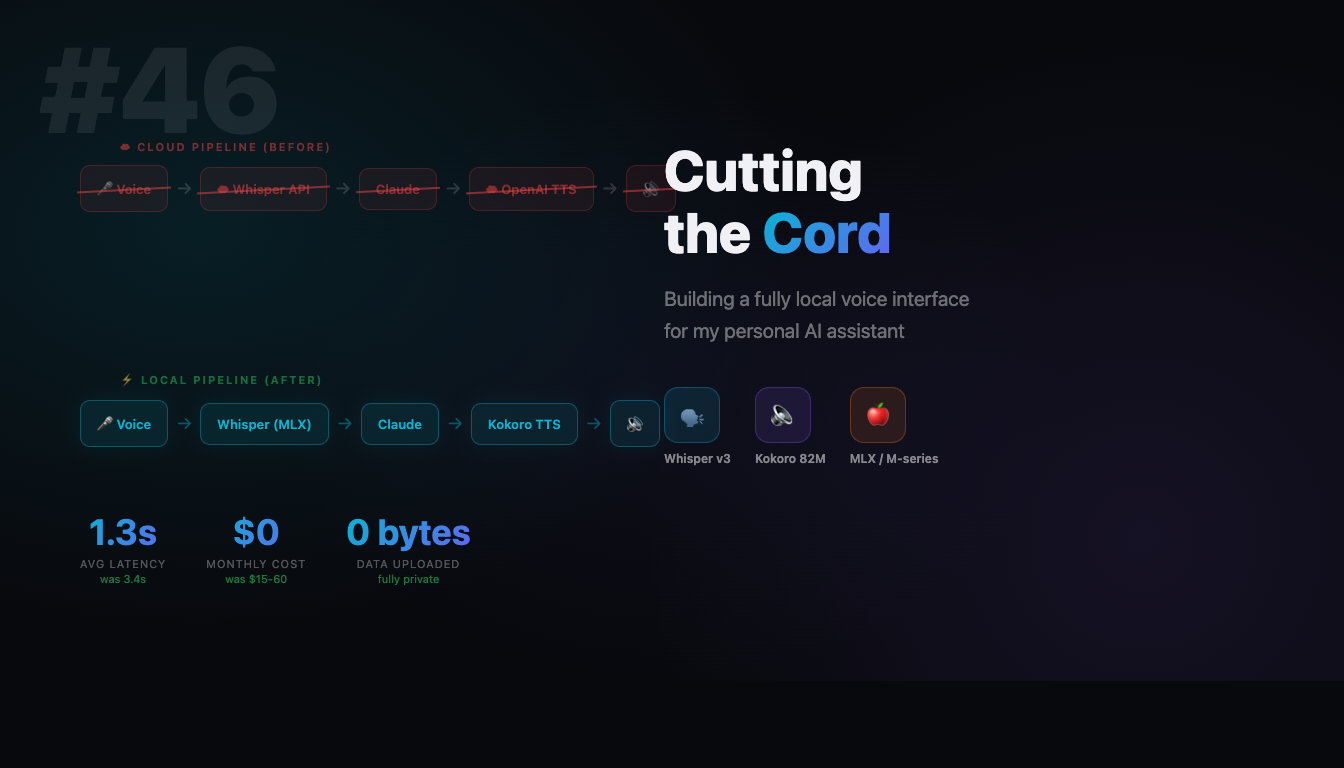
Cutting the Cord: How I Built a Fully Local Voice Interface for My Personal AI
A developer’s journey from cloud-dependent voice APIs to a private, faster, and free local alternative
Every time I spoke to my AI assistant, my voice traveled thousands of miles. To OpenAI’s servers. Stored somewhere. Processed by systems I didn’t control. Then the response came back---synthesized speech, 2-3 seconds later, after a round trip across the internet.
It worked. But something about it felt wrong.
This is the story of how I cut that cord entirely. How I built a fully local voice pipeline that’s faster, completely private, and costs nothing to run. And the unexpected rabbit holes I fell into along the way.
The Problem with Cloud Voice
Let me be blunt about what “cloud voice AI” actually means:
Your voice goes to their servers. Every utterance, every question, every half-formed thought you speak aloud---uploaded, processed, and stored on infrastructure you don’t control. OpenAI’s privacy policy is reasonable, but reasonable isn’t the same as private.
Latency adds up. When you speak to a cloud-based AI:
- Your audio uploads (200-500ms)
- Speech-to-text processing happens (500-1000ms)
- The AI thinks (variable)
- Text-to-speech generates (500-1000ms)
- Audio downloads and plays (200-500ms)
That’s 2-4 seconds of waiting before you hear a response. Conversations feel sluggish. The rhythm of natural dialogue breaks down.
Costs accumulate. OpenAI charges $0.015 per 1,000 characters for TTS. Whisper API costs add up too. For someone who talks to their AI assistant regularly, this becomes $15-60/month. Not ruinous, but not nothing.
Dependency is fragile. Service outages happen. Rate limits kick in during extended sessions. Your voice assistant becomes a reminder that you’re renting capability, not owning it.
I wanted something different.
What I Was Starting With
My setup wasn’t exotic. Claude Code as the AI brain---Anthropic’s CLI tool that puts Claude in your terminal. VoiceMode MCP for voice integration---a Model Context Protocol server that handles the audio pipeline. OpenAI’s APIs for the heavy lifting: Whisper for speech-to-text, their TTS for speech synthesis.
The architecture looked like this:
Speech --> [Internet] --> Whisper API --> Text --> Claude --> Text --> [Internet] --> OpenAI TTS --> AudioIt worked. I could talk to Claude, hear responses spoken back. But every interaction reminded me of those round trips to the cloud.
The question became: could I run this entire pipeline locally?
The Goal: Complete Local Voice
I wanted:
Speech --> Local Whisper --> Text --> Claude --> Text --> Local TTS --> AudioNo network hops for audio. No uploaded voice data. Sub-second response times. Zero ongoing cost.
The constraints were specific:
- Must run on Apple Silicon (my daily driver is an M-series Mac)
- Must match or exceed cloud quality (no robotic voices)
- Must integrate cleanly with VoiceMode MCP (no rewrites)
- Must be genuinely simpler than the cloud version
That last point might seem counterintuitive. Local AI is supposed to be harder, right? But I had a hypothesis: a well-designed local setup could actually be simpler because you control all the pieces.
Let’s see if I was right.
Building Block 1: Local Speech-to-Text
Speech-to-text is the first link in the chain. Your voice becomes text that the AI can understand.
Choosing the Right Whisper
OpenAI’s Whisper model is open source, which means you can run it yourself. The question is: which version, and how?
For Apple Silicon, the answer is MLX---Apple’s machine learning framework optimized for their chips. The mlx-community/whisper-large-v3-turbo model gives you near-cloud accuracy while running entirely on your GPU.
The model is about 1GB. It loads once, stays in memory, and transcribes speech in well under a second.
The Setup
VoiceMode MCP includes a built-in Whisper server. This was a pleasant surprise---I didn’t need to set up a separate service. The configuration is minimal:
VOICEMODE_STT_BASE_URLS=http://127.0.0.1:2022/v1
VOICEMODE_WHISPER_MODEL=large-v3-turbo
That’s it. Port 2022 runs a local Whisper server that exposes an OpenAI-compatible API. Your existing code doesn’t even know the difference.
Real-World Performance
After setup, I timed typical utterances:
- Short phrases (5-10 words): ~0.5 seconds
- Normal sentences: ~0.7-1.0 seconds
- Long paragraphs: ~1.5-2.0 seconds
Compare this to cloud Whisper, which adds network latency on top of processing time. The local version is consistently faster.
Accuracy? I haven’t noticed any degradation. The large-v3-turbo model handles accents, mumbling, and background noise about as well as the cloud version. It’s the same model, after all---just running on my machine.
Building Block 2: Local Text-to-Speech
This is where it gets interesting.
Text-to-speech has historically been the weak link in local AI. The models were either too large (requiring beefy GPUs), too slow (taking seconds to generate), or too robotic (sounding obviously synthetic).
That changed with Kokoro.
Why Kokoro?
Kokoro is a lightweight TTS model---just 82 million parameters. For context, that’s tiny. GPT-3 has 175 billion. But Kokoro punches way above its weight class.
The key stats:
- Size: 82M parameters (~300MB on disk)
- Speed: Sub-second generation for typical sentences
- Quality: Natural-sounding voices that don’t scream “AI”
- Platform: MLX-optimized for Apple Silicon
I was skeptical before trying it. An 82M model producing natural speech? But the first time I heard it speak, I understood. Kokoro sounds good. Not perfect---you can tell it’s synthetic if you listen carefully---but genuinely pleasant. Like a competent voice actor, not a robot.
The Setup
Kokoro runs via mlx_audio.server on port 8880:
VOICEMODE_TTS_BASE_URLS=http://127.0.0.1:8880/v1
VOICEMODE_TTS_MODELS=prince-canuma/Kokoro-82M
VOICEMODE_VOICES=af_heart
The af_heart voice is warm and natural---my default choice. Kokoro includes multiple voices if you want variety.
The Sample Rate Gotcha
Here’s where I hit my first real snag.
Kokoro outputs audio at 24kHz. My audio devices---HDMI-connected monitors---expected 48kHz. The result? Silence. The audio files were valid (I could verify with analysis tools), but nothing played.
The fix was simple once I understood the problem:
VOICEMODE_AUDIO_FORMAT=mp3MP3 encoding handles the sample rate conversion automatically. WAV files at mismatched sample rates can cause problems; MP3 just works.
This took longer to debug than I’d like to admit. The lesson: when local audio plays in some contexts but not others, suspect sample rate mismatches.
Integration: Making It All Work Together
The individual pieces were working. Now they needed to talk to each other.
Configuration Hierarchy
VoiceMode MCP reads configuration from multiple places, in priority order:
- MCP configuration (
~/.mcp.json) --- highest priority - Local voicemode.env (in working directory)
- Global voicemode.env (
~/.voicemode/voicemode.env)
This bit me. I had old cloud settings in my MCP config that kept overriding my carefully crafted local settings. The lesson: check ALL configuration files when things don’t work as expected.
My final MCP configuration:
{
  "voicemode": {
    "command": "/Users/username/.local/bin/voice-mode",
    "env": {
      "VOICEMODE_TTS_BASE_URLS": "http://127.0.0.1:8880/v1",
      "VOICEMODE_STT_BASE_URLS": "http://127.0.0.1:2022/v1",
      "VOICEMODE_TTS_MODELS": "prince-canuma/Kokoro-82M",
      "VOICEMODE_VOICES": "af_heart",
      "VOICEMODE_AUDIO_FORMAT": "mp3",
      "VOICEMODE_TTS_SPEED": "1.2"
    }
  }
}
Voice Parameters
A few settings worth mentioning:
Speed adjustment. Kokoro defaults to 1.0x speed, which I found slightly slow. I settled on 1.2x---faster without sounding rushed. The range 1.0-1.5x is comfortable for most people.
VAD tuning. Voice Activity Detection determines when you’ve stopped talking. Too aggressive, and it cuts you off mid-sentence. Too passive, and there’s awkward silence. I use:
VOICEMODE_VAD_AGGRESSIVENESS=1
VOICEMODE_SILENCE_THRESHOLD_MS=1500
VOICEMODE_MIN_RECORDING_DURATION=2.0
This waits 1.5 seconds of silence before assuming you’re done, with a minimum recording of 2 seconds. Adjust based on your speaking style.
Service Lifecycle
VoiceMode handles service management cleanly:
# Check status
service kokoro status
service whisper status

# Restart if needed
service kokoro restart
The services auto-start on first voice request. After initial model loading (a few seconds), subsequent requests are fast.
The Results: Before and After
Let’s talk numbers.
Latency Comparison
| Stage | Cloud | Local |
|---|---|---|
| Speech-to-Text | 1.5-2.0s | 0.7-1.0s |
| Text-to-Speech | 1.0-1.5s | 0.3-0.7s |
| Network Overhead | 0.3-0.5s | 0ms |
| Total | 2.8-4.0s | 1.0-1.7s |
That’s roughly 2-3x faster. The difference is immediately noticeable in conversation. Responses feel responsive.
Cost Comparison
| Period | Cloud | Local |
|---|---|---|
| Per session | $0.50-2.00 | $0 |
| Monthly | $15-60 | $0 |
| Yearly | $180-720 | $0 |
There’s an upfront time cost---this setup took me a few hours including debugging. But the ongoing cost is zero.
Privacy
This is the big one.
Cloud: Every word you speak uploads to external servers. Stored somewhere. Retained according to policies you didn’t write. Potentially used for training.
Local: Audio never leaves your machine. Full stop. Your conversations are yours.
For personal AI---an assistant that knows your projects, your preferences, your half-formed ideas---this matters. Privacy isn’t just about hiding secrets. It’s about having a space where you can think aloud without an audience.
Lessons Learned
What Worked Well
MLX is production-ready. Apple’s ML framework handled both Whisper and Kokoro without drama. Models load quickly, inference is fast, memory management is reasonable.
VoiceMode’s modular design paid off. Swapping from cloud to local was mostly configuration changes. The abstraction layer meant I wasn’t rewriting code.
Simpler beats experimental. Kokoro just works. It’s not the most advanced TTS model available, but reliability beats features.
Challenges Overcome
Sample rate mismatches. Local audio is pickier about format compatibility than cloud audio (which handles conversion server-side). MP3 format solved this.
Configuration layers. Multiple config files with different priorities caused confusion. Document your config locations.
Service initialization. First requests after starting a service are slow (model loading). Subsequent requests are fast. Set expectations accordingly.
Tips for Others
- Start simple. Get the basic pipeline working before optimizing.
- Test components independently. Verify Whisper works before adding Kokoro. Verify Kokoro works before integrating with your AI.
- Check ALL config files. When settings don’t take effect, you probably have conflicting configurations somewhere.
- Use MP3 format. It’s more forgiving than PCM/WAV for device compatibility.
The Road Not Taken: Maya1
I should mention an experiment that didn’t work out.
Maya1 is a 3B parameter TTS model with expressive capabilities---emotion tags, fine-grained control over delivery. On paper, it’s more advanced than Kokoro. In practice, on my setup, it was a nightmare.
The issues:
- MLX quantized versions (4-bit, 8-bit) were extremely sensitive to prompt formatting
- Small changes in input caused: silent output, reading instructions aloud, gibberish
- The full precision model requires more VRAM than typical Mac configurations
I spent hours debugging Maya1. Added missing tokens. Tuned sampling parameters. Tried different quantization levels. Each fix revealed new problems.
Eventually, I stopped. Kokoro works. Maya1 might work better someday---the underlying model is impressive---but for production use, reliability wins.
The lesson: cutting-edge isn’t always best. A smaller model that works consistently beats a larger model that works sometimes.
Conclusion: The Future is Local
What I built:
- Fully private voice conversations with AI
- 2-3x faster response times than cloud
- Zero ongoing costs
- Complete independence from external services
The surprising part? It wasn’t that hard. A few hours of setup, some configuration debugging, and I had something that works better than the cloud version I was paying for.
Local AI is at an inflection point. The models are good enough. The frameworks are mature enough. The hardware---especially Apple Silicon---is capable enough. What was experimental a year ago is practical today.
If you’ve been waiting for local voice AI to be ready: it’s ready.
Getting Started
If you want to try this yourself:
- Install VoiceMode MCP --- handles the voice pipeline and service management
- Configure local endpoints --- point to localhost ports instead of cloud APIs
- Start the services --- Whisper on 2022, Kokoro on 8880
- Talk to your AI --- everything runs on your machine
The specific commands depend on your setup, but the VoiceMode documentation covers the details.
Welcome to local voice AI. Your conversations are yours again.
Appendix: Quick Reference Configuration
For those who just want the config:
# ~/.mcp.json voice settings
"voicemode": {
  "env": {
    "VOICEMODE_TTS_BASE_URLS": "http://127.0.0.1:8880/v1",
    "VOICEMODE_STT_BASE_URLS": "http://127.0.0.1:2022/v1",
    "VOICEMODE_TTS_MODELS": "prince-canuma/Kokoro-82M",
    "VOICEMODE_STT_MODELS": "mlx-community/whisper-large-v3-turbo",
    "VOICEMODE_VOICES": "af_heart",
    "VOICEMODE_PREFER_LOCAL": "true",
    "VOICEMODE_AUDIO_FORMAT": "mp3",
    "VOICEMODE_TTS_SPEED": "1.2",
    "VOICEMODE_VAD_AGGRESSIVENESS": "1",
    "VOICEMODE_SILENCE_THRESHOLD_MS": "1500",
    "VOICEMODE_MIN_RECORDING_DURATION": "2.0"
  }
}
Models used:
- STT:
mlx-community/whisper-large-v3-turbo - TTS:
prince-canuma/Kokoro-82M - Voice:
af_heart